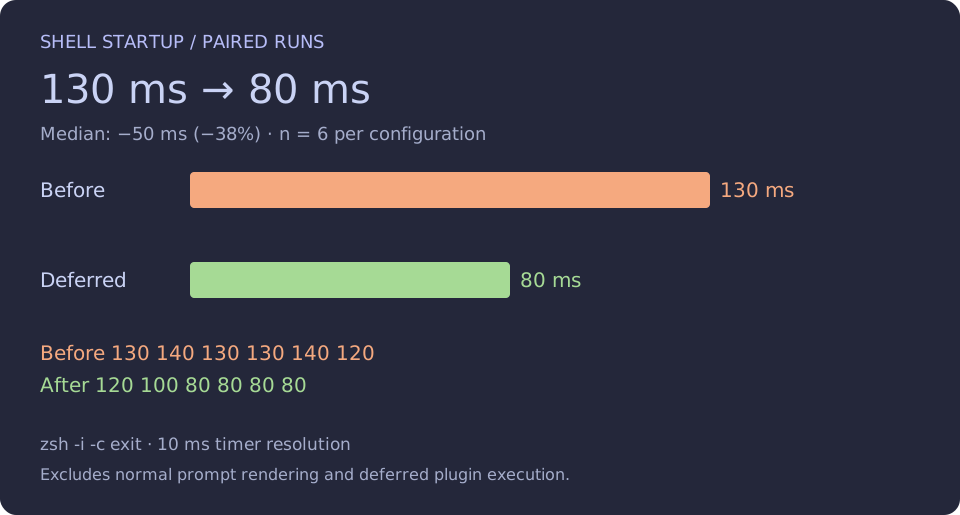
An old run of my interactive shell took 1.68 seconds. It was a single measurement, not a paired benchmark. In the paired test, startup followed by exit fell from a 130 ms median to 80 ms after I deferred the Zsh plugins.
That 80 ms ends before normal prompt rendering and deferred plugin loading. It excludes launching Ghostty and Zellij. I have not measured the time until every interactive feature is ready.
What you get
Copy any piece you like. Each section has the snippet it explains. The complete configuration at the end has every file in full: .zshrc, Starship, Ghostty, and the Zellij config and layout.
- A fast Zsh: cached completion, deferred plugins and a way to profile your own startup with
zprof. - Better daily tools: fzf-tab for completion, zjyo for jumping between directories, goenv v3, and a Starship prompt with Git status on the right.
- Ghostty with a dropdown terminal on a global hotkey.
- Zellij with tmux-style
Ctrl-akeys, splits, floating panes, detach and reattach, and the zj-radar rail that shows what each coding agent is doing. - A reproducible Mac: chezmoi with age-encrypted secrets and a Brewfile.
The examples contain no secret values.
Why I rebuilt it
I have carried one set of dotfiles for ten years. It was mostly tuned and mostly bandaged, and I decided it was time to modernize it. Faster tools now cover the same established workflows, so I could keep how I work and drop the cost.
Agents make that cost easier to notice. Claude Code starts a new shell process for every command it runs, and one Zellij session can have several agents going at once. I checked what that shell actually does on my machine. It is not the interactive path my 80 ms figure measures:
zsh -c true                  6 ms   non-interactive
zsh -c "source <snapshot>"   9 ms   how Claude Code runs a command
zsh -lc true                21 ms   login shell, reads .zprofile
zsh -ic true                90 ms   interactive, reads .zshrc
These are averages of five runs on one machine. Claude Code saves a snapshot of my shell functions and aliases, and each command is zsh -c 'source <snapshot> && …'. .zshrc is not read again for every command. So the 80 ms is what I pay when I open a pane or a terminal. The per-command cost for an agent is closer to 10–20 ms, and it depends on .zprofile and the size of the snapshot. I did not check how Codex starts its shells.
The numbers
| Change | Measured startup |
|---|---|
| Cleaned shell, ordinary completion initialization | ~320–330 ms, eight runs |
Reuse completion dump with compinit -C | 120 ms × 7, 130 ms × 1 |
| Separate paired baseline before deferring plugins | 130 ms median, six runs |
Defer plugins with Zinit wait"0" | 80 ms median, six runs |
Paired samples (ms)
Before: 130 140 130 130 140 120
After:  120 100  80  80  80  80
Median reduction: 50 ms / 38%
The paired runs used a pseudo-terminal and inherited TMUX, so the auto-attach guard skipped Zellij. The timer reports hundredths of a second, so the displayed values have 10 ms resolution.
# Run inside an existing tmux or Zellij session to skip auto-attach.
for run in {1..6}; do
  /usr/bin/time -p zsh -i -c exit
done
How I profile, and how you can
I start with zprof, Zsh’s built-in profiler. It counts calls and time per shell function. Load it at the top of ~/.zshrc and print it at the end:
# first line of ~/.zshrc
zmodload zsh/zprof

# ... the rest of the file ...

# last line
zprof
To profile without editing the file, load it through a throwaway ZDOTDIR:
mkdir -p /tmp/zprof
printf 'zmodload zsh/zprof\nsource "$HOME/.zshrc"\n' > /tmp/zprof/.zshrc
ln -sf ~/.zcompdump* /tmp/zprof/        # keep the cached completion dump
CI=1 ZDOTDIR=/tmp/zprof zsh -i -c zprof | head -20
The ln line matters. Zsh looks for .zcompdump in ZDOTDIR. My first run did not find it, so compinit rebuilt the dump: 307 ms, with 848 compdef calls. That is the cost of an uncached compinit, not of my current setup. With the dump linked, my current .zshrc looks like this (times in ms, second run):
num  calls   time   self    self%   name
 1)    1    11.10  11.10   52.19%   _mise_hook
 2)    1     3.78   3.78   17.76%   compinit
 3)   29     5.17   2.69   12.63%   zinit
 4)   28     1.26   1.08    5.08%   .zinit-ice
zprof has two blind spots. It only sees shell functions, so a command substitution such as eval "$(starship init zsh)", eval "$(fzf --zsh)" or eval "$(goenv init -)" costs time that no row shows. It also stops at the first prompt, so plugins loaded with wait"0" are not in it. For both, measure the whole startup with a plain timer, as in the loop above. hyperfine does the same with warm-up runs:
hyperfine --warmup 3 'zsh -i -c exit'
My workflow is to use zprof to find the expensive function, change one thing, and then time the whole startup to check that the change helped.
Cache completion. Keep fzf-tab.
Profiling put compinit at ~210 ms, including ~136 ms in 859 compdef calls. Cached initialization later appeared around 4 ms. These nested costs must not be added together.
# ~/.zshrc — before loading fzf-tab
fpath=("$HOMEBREW_PREFIX/share/zsh/site-functions" $fpath)
fpath=("$HOME/.config/zsh/completions" $fpath)

autoload -Uz compinit
compinit -C
zinit cdreplay -q

eval "$(fzf --zsh)"
zinit ice wait"0" lucid
zinit light Aloxaf/fzf-tab
fzf-tab picks completion candidates. compinit initializes the completion system that supplies them. compinit -C skips discovery and, with an existing dump, the security audit. I checked compaudit first. After changing completion sources, refresh with ordinary initialization:
autoload -Uz compaudit compinit
compaudit
compinit
Here is fzf-tab at work:
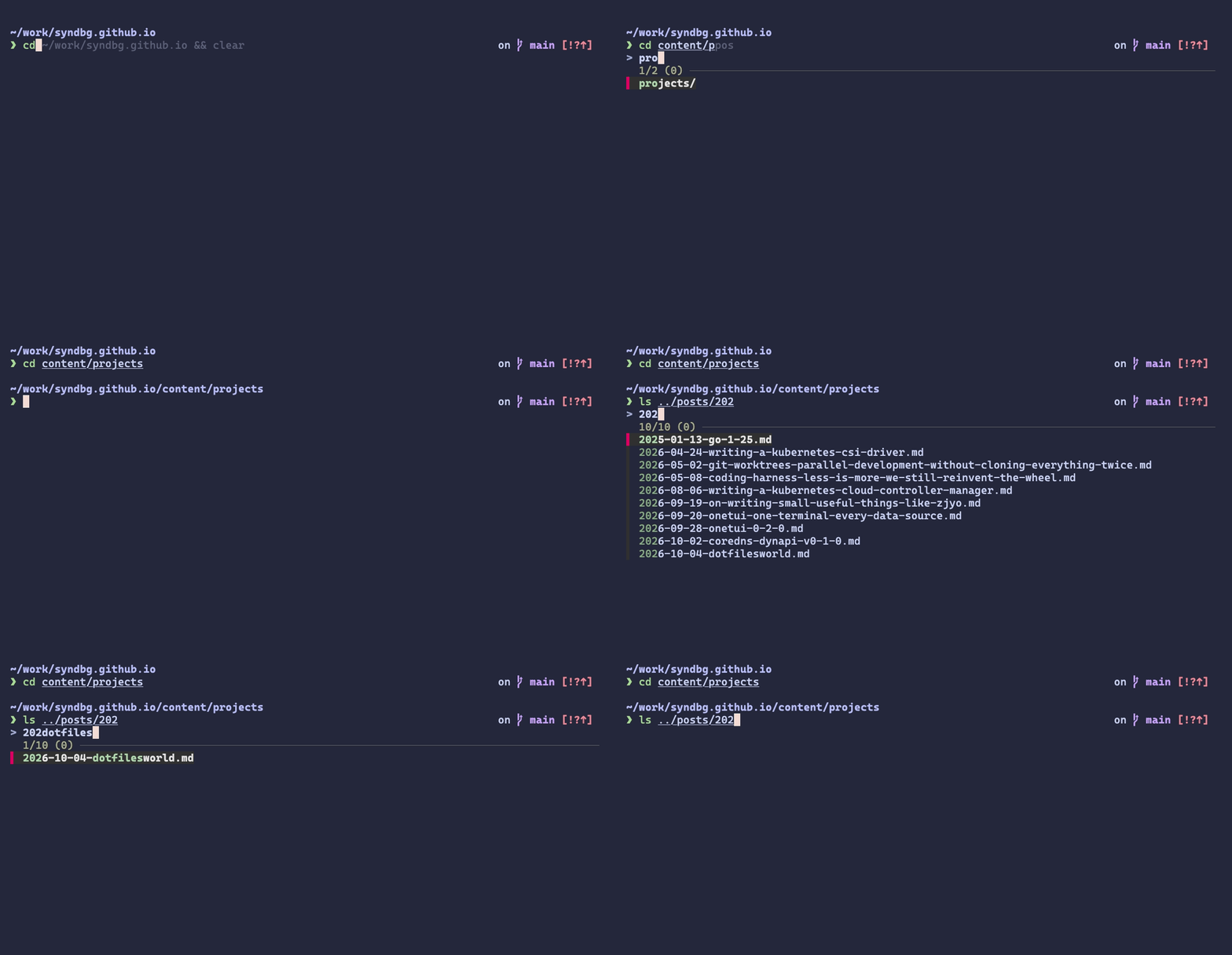
The first Tab inserts the common prefix, as plain Zsh would. The second opens the fzf popup, already filtered by what you have typed, so type only the next characters. The popup works for any completion Zsh offers, not only paths.
Load the plugins I use
Homebrew installs the tools. Zinit loads shell plugins. This is an excerpt of the current .zshrc; load Zinit before the completion block above, and keep highlighting after the other widgets.
brew install zinit fzf eza starship mise direnv
source "$HOMEBREW_PREFIX/opt/zinit/zinit.zsh"

# mkdir + cd, directory navigation, shared functions
zinit ice wait"0" lucid
zinit snippet OMZL::directories.zsh
zinit ice wait"0" lucid
zinit snippet OMZL::functions.zsh

# Git helpers and aliases: gst, gco, gp...
zinit ice wait"0" lucid
zinit snippet OMZL::git.zsh
zinit ice wait"0" lucid
zinit snippet OMZP::git
zinit cdclear -q

# Project .envrc loading and ls aliases
zinit ice wait"0" lucid
zinit snippet OMZP::direnv
zinit ice wait"0" lucid
zinit snippet OMZP::eza

# Inline suggestions and searchable history
zinit ice wait"0" lucid
zinit light zsh-users/zsh-autosuggestions
zinit ice wait"0" lucid
zinit light zsh-users/zsh-history-substring-search

# Put this after the other widget setup.
zinit ice wait"0" lucid
zinit light zsh-users/zsh-syntax-highlighting
| Tool | Job |
|---|---|
| fzf-tab | Fuzzy completion picker |
| zsh-autosuggestions | Inline suggestions from history |
| history-substring-search | Recall matching commands with bound keys |
| syntax-highlighting | Highlight the command line while editing |
| eza | Directory listings with icons and Git status |
| direnv | Project environment changes |
wait"0" moves loading after the first prompt. It also changes alias ordering: deferred Git aliases can overwrite local aliases. My own file also loads a Homebrew snippet, an appearance snippet and async_prompt.zsh. The last one has no demonstrated benefit with Starship and remains a cleanup candidate. The complete minimal .zshrc is in the last section.
Split .zshrc into files I can maintain
~/.zshrc                       initialization order
~/.config/zsh/aliases.zsh       shortcuts
~/.config/zsh/functions.zsh     functions and widgets
~/.zsh.secrets                  encrypted in chezmoi source
~/.config/starship.toml         prompt
source "$HOME/.config/zsh/aliases.zsh"
source "$HOME/.config/zsh/functions.zsh"
[[ -r "$HOME/.zsh.secrets" ]] && source "$HOME/.zsh.secrets"

HISTSIZE=50000
SAVEHIST=50000
HISTFILE="${ZDOTDIR:-$HOME}/.zsh_history"
setopt inc_append_history share_history
setopt HIST_IGNORE_ALL_DUPS HIST_IGNORE_SPACE HIST_SAVE_NO_DUPS
bindkey -v

bindkey '^P' history-substring-search-up
bindkey '^N' history-substring-search-down
bindkey -M vicmd 'k' history-substring-search-up
bindkey -M vicmd 'j' history-substring-search-down
NVM is gone, including its duplicated Bash completion. I kept full mise activate zsh: a shims trial saved about 20 ms, but I wanted parent-shell environment updates when changing directories. Go still uses goenv.
eval "$(goenv init -)"
eval "$(mise activate zsh)"
goenv: v2 was Bash, v3 is Go
eval "$(goenv init -)" runs on every interactive start, so goenv’s own startup counts. goenv v2 is written in Bash. In my runs it took about 110 ms. v3 is written in Go and takes under 10 ms.
eval "$(goenv init -)"
zprof cannot show this cost, because goenv init - is an external process. That is why the whole-startup timer matters. If your startup time is stuck, look for eval "$(… init -)" lines.
Thanks to the maintainers who keep goenv going, and for the move to Go. I will also take a little credit for not writing an even slower v2 in Bash, initially. 110 ms could have been worse. :D
Jump around with zjyo
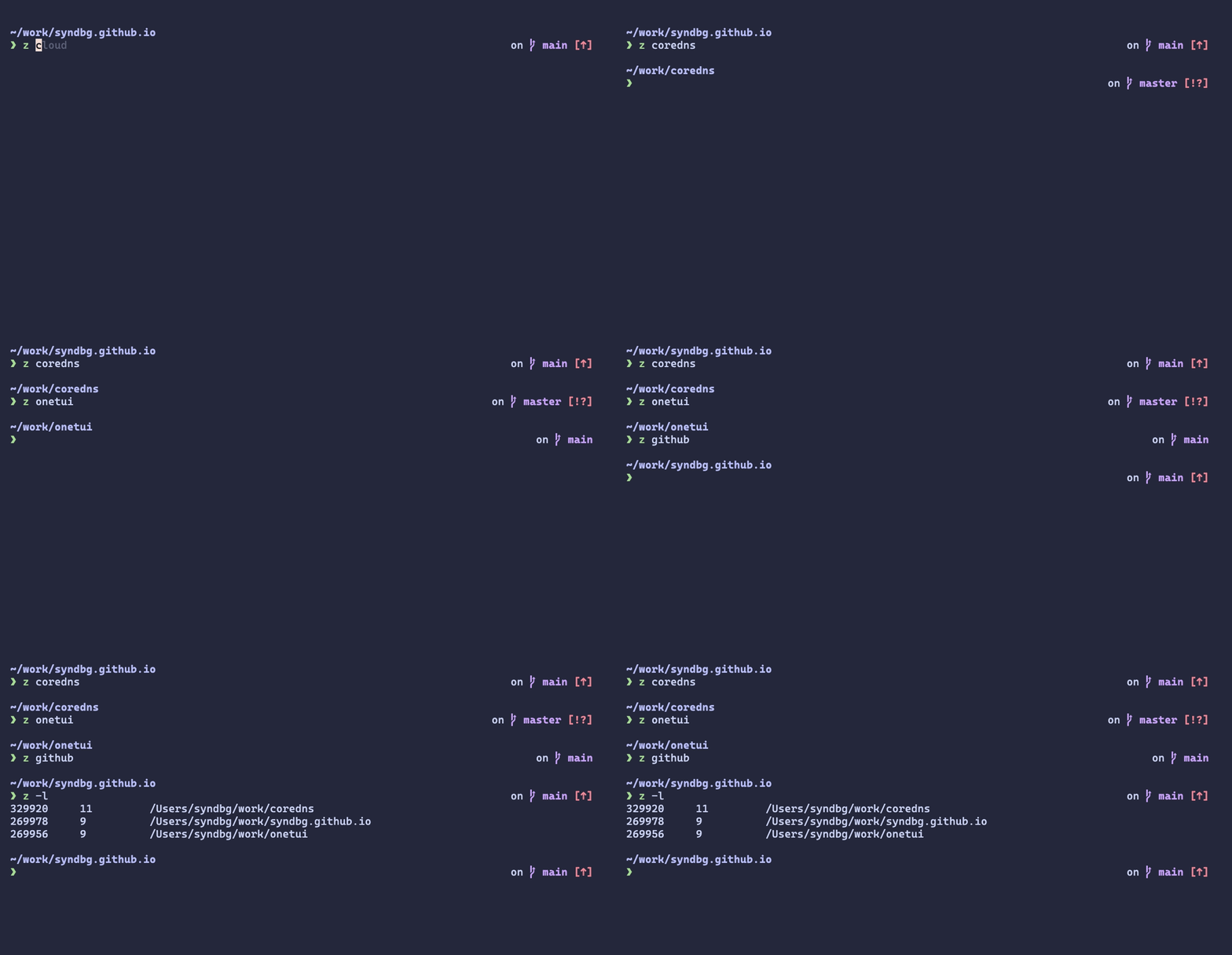
z <pattern> jumps to the best match among the directories I have visited. zjyo is the small tool I wrote for this, and the GIF shows it. z -l lists the tracked directories.
Full path. Git on the right. No runtime versions.
A compact Starship configuration using the Macchiato colors directly:
# ~/.config/starship.toml
format = "$directory$line_break$character"
right_format = "$git_branch$git_status"

[directory]
truncation_length = 0
truncate_to_repo = false
style = "bold #b7bdf8"

[git_branch]
style = "bold #c6a0f6"

[git_status]
style = "bold #ed8796"

[character]
success_symbol = "[❯](bold #a6da95)"
error_symbol = "[❯](bold #ed8796)"
# ~/.zshrc
eval "$(starship init zsh)"
The colors are the Catppuccin Macchiato values written inline. Path depth is preserved, though home can still appear as ~.
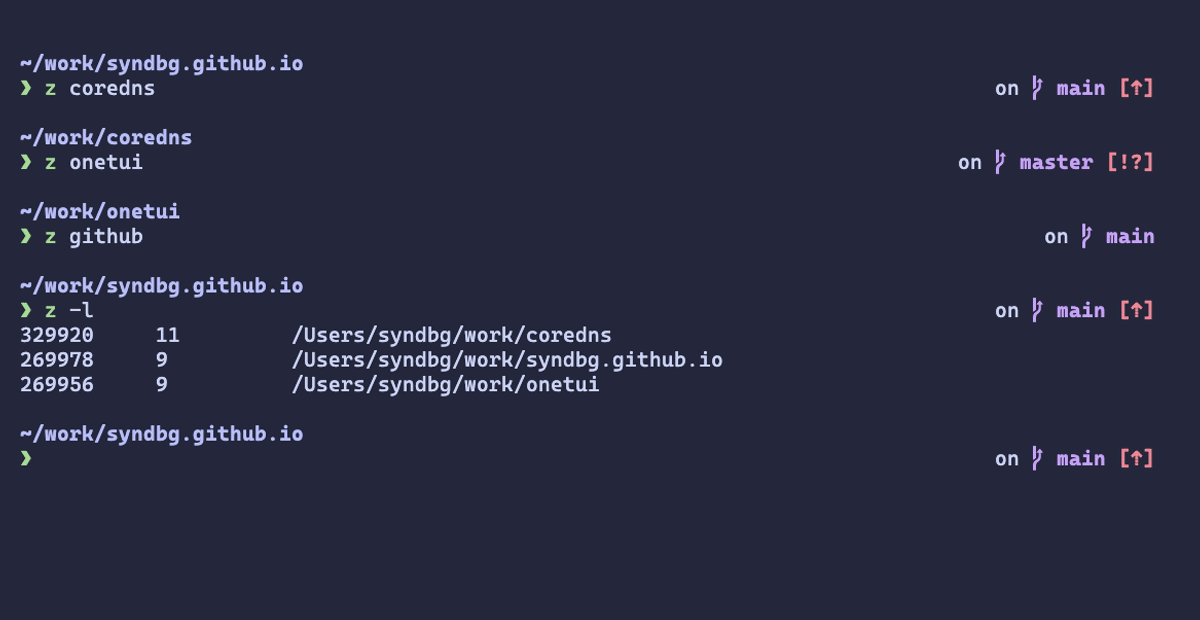
Putting Git on the right keeps the left edge clean, so the command line always starts at the same column. A directory with no Git repository leaves the right side empty.
Ghostty as a dropdown terminal
Ghostty hosts everything else. Its config is short: the Catppuccin Macchiato theme, a larger font, and a quick terminal that drops down from the top of the screen and covers all of it. Cmd-F1 toggles it from any app.
# ~/.config/ghostty/config

# Global hotkey for the quick terminal
keybind = global:cmd+f1=toggle_visibility

# Drop down from the top and cover the whole screen, with no animation
quick-terminal-position = top
quick-terminal-size = 100%
quick-terminal-animation-duration = 0

cursor-style-blink = false

theme = Catppuccin Macchiato
font-size = 18
copy-on-select = clipboard
clipboard-trim-trailing-spaces = true
tmux muscle memory, Zellij workspaces
I wanted Zellij’s modes and an agent-status sidebar, while keeping Ctrl-a. These were the useful parts of my old .tmux.conf:
set -g prefix C-a
unbind C-b
bind C-a send-prefix
set -sg escape-time 0
set -g base-index 1
setw -g pane-base-index 1
setw -g mode-keys vi

bind \\ split-window -h
bind - split-window -v
bind h select-pane -L
bind j select-pane -D
bind k select-pane -U
bind l select-pane -R
bind Escape copy-mode
bind-key -T copy-mode-vi v send -X begin-selection
bind-key -T copy-mode-vi y send -X copy-selection
TPM loaded Catppuccin, yank/open helpers, and resurrect/continuum for saving workspace arrangements. Zellij uses this prefix override:
// ~/.config/zellij/config.kdl — merge into existing keybinds
keybinds {
    unbind "Ctrl b"
    normal {
        bind "Ctrl a" { SwitchToMode "Tmux"; }
    }
    tmux {
        bind "Ctrl a" { Write 1; SwitchToMode "Normal"; }
        bind "-" { NewPane "Down"; SwitchToMode "Normal"; }
        bind "/" { NewPane "Right"; SwitchToMode "Normal"; }
        bind "r" "," { SwitchToMode "RenameTab"; TabNameInput 0; }
        bind "e" "Esc" { EditScrollback; SwitchToMode "Normal"; }
        bind "1" { GoToTab 1; SwitchToMode "Normal"; }
    }
}
Press Ctrl-a, release, then the action key. The complete config at the end adds tabs 2–9 and these controls:
| Action key | Result |
|---|---|
- / / | Split below / right |
r or , | Rename tab |
Shift-r | Floating prompt to rename the session |
s, Shift-s, or q | Session manager |
e or Escape | Open scrollback in the editor |
Shift-q | Run zellij kill-all-sessions |
Different from tmux: Escape opens an editor rather than copy mode. q opens the manager rather than killing the current session. Old resize and clipboard bindings are not all ported.
Search scrollback in Neovim
Ctrl-a e and Ctrl-a Escape are my replacement for tmux’s copy mode. Both run EditScrollback:
bind "e" "Esc" { EditScrollback; SwitchToMode "Normal"; }
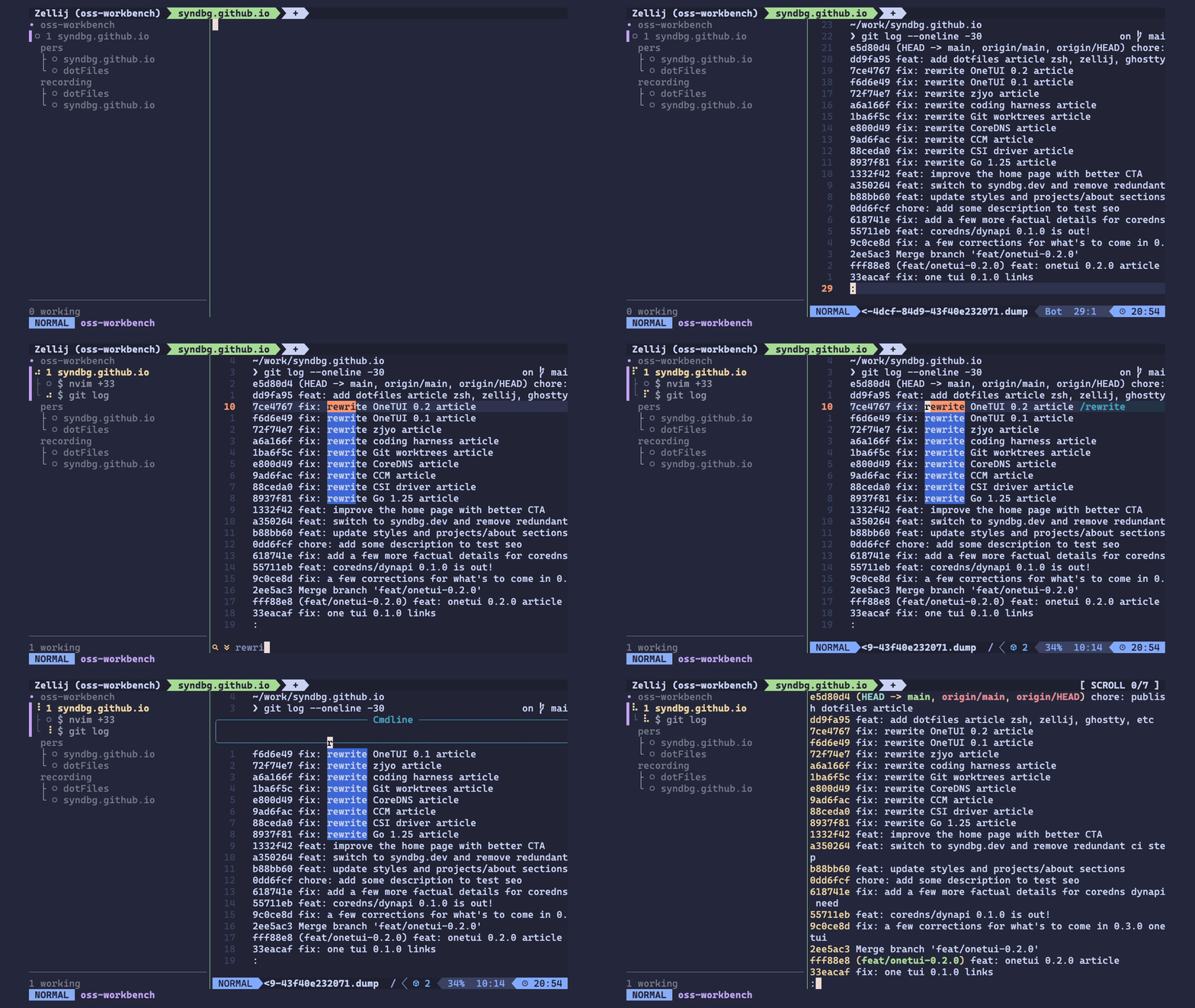
Zellij writes the pane’s scrollback to a temporary file and opens it in a new pane with your editor. The cursor starts on the last line, so everything above it is a normal Neovim buffer: search with /, move with the usual motions, and quit with :q to go back to the shell. That makes finding an old error in long output a search instead of scrolling.
My config does not set an editor for this, and it works because my shell exports EDITOR=nvim. To pin it, add scrollback_editor to config.kdl:
scrollback_editor "nvim"
Shift-r renames the current session directly. This is the binding in config.kdl:
bind "Shift r" {
    Run "sh" "-c" "printf 'New session name: '; IFS= read -r name || exit; [ -n \"$name\" ] || exit; exec zellij action rename-session \"$name\"" {
        floating true
        close_on_exit true
        name "Rename session"
    };
    SwitchToMode "Normal";
}
Claude Code status in Zellij
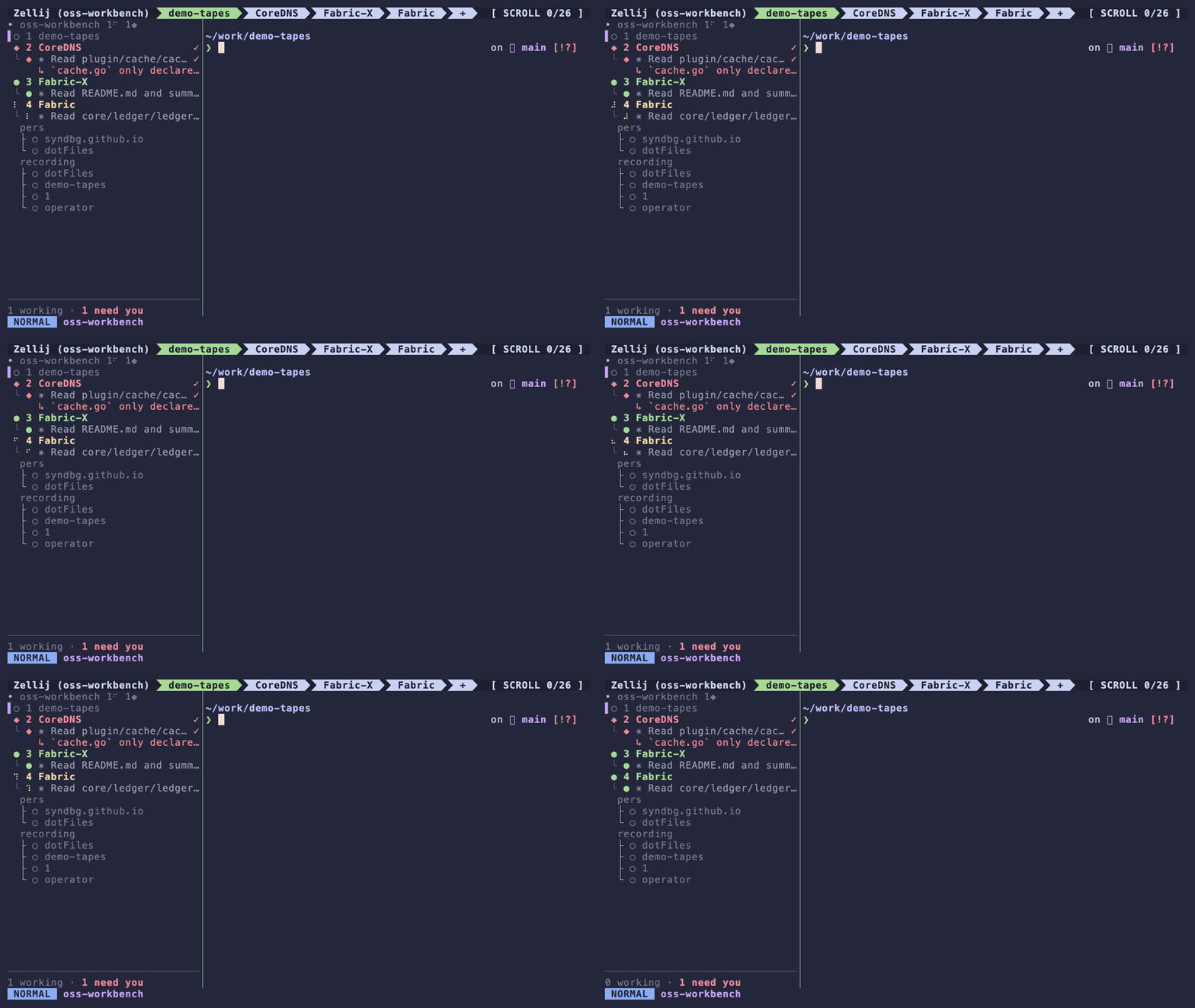
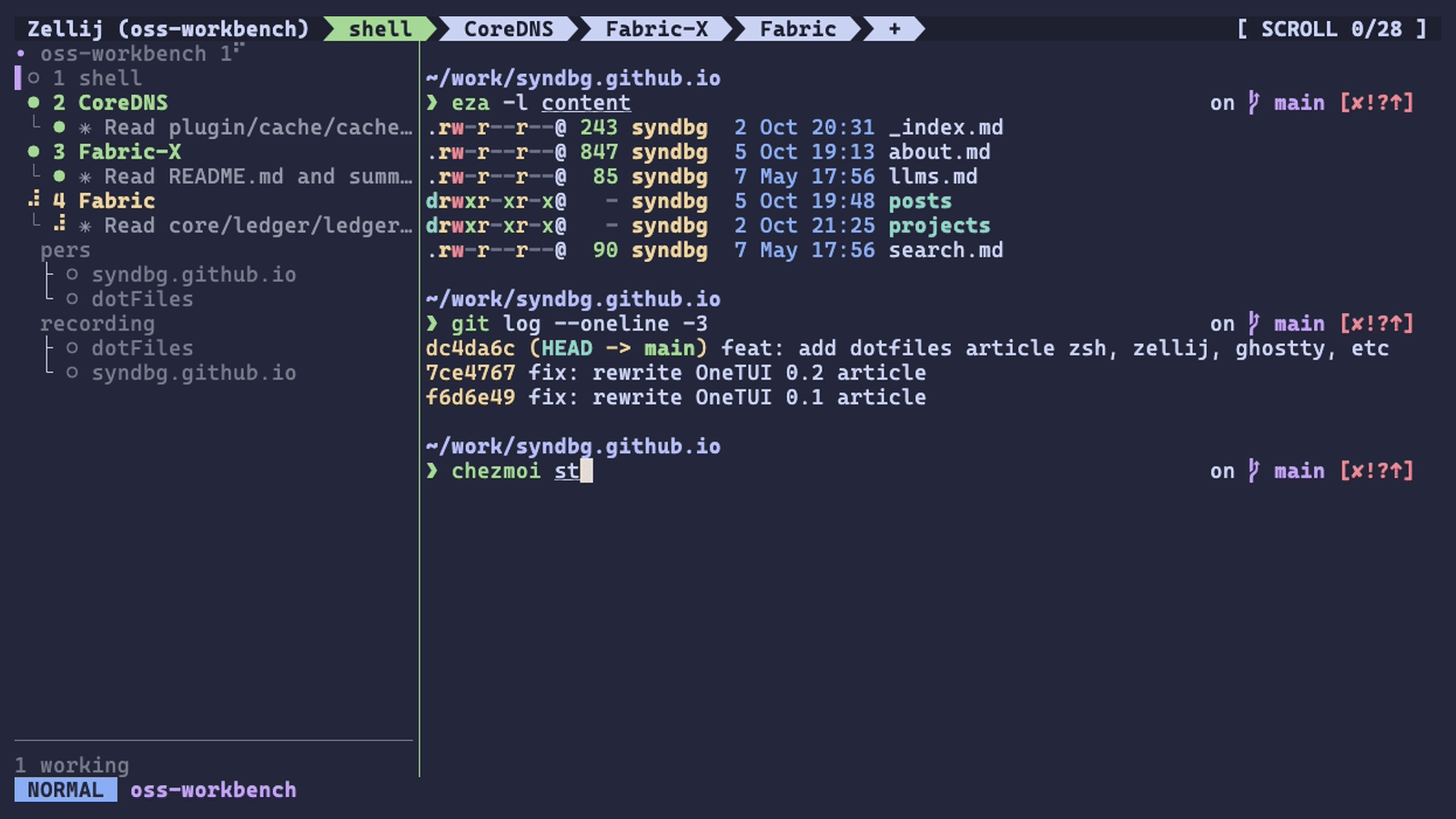
Three agents at a glance. The rail shows done, working and needs-you without leaving the shell tab.
Ghostty hosts the terminal. Zellij uses a custom layout (in the complete configuration at the end), Catppuccin Macchiato colors, the native tab bar, and zjstatus. zj-radar adds the agent status rail.
zj-radar needs Zellij 0.44.3 or newer. This is the quick start from its README:
# Install the CLI, then the sidebar. Each step asks for confirmation.
curl --proto '=https' --tlsv1.2 -LsSf \
  https://github.com/marktoda/zj-radar/releases/latest/download/install.sh | sh
zj-radar setup zellij --download

# Wire up your agents. Without this the rail lists tabs but shows no status.
zj-radar setup claude
zj-radar setup codex     # then run /hooks inside Codex to trust the hooks
zj-radar run starts a throwaway session with the rail wired in and leaves your config alone, which is a safe way to look first. Zellij asks you to grant ReadApplicationState, ChangeApplicationState, and RunCommands the first time the plugin loads. The plugin reads pane and tab state, changes Zellij UI state, and runs host commands. See Zellij’s plugin permissions.
The rail lists every agent under its tab, and the footer counts how many are working and how many need you. The plugin alias lives in config.kdl:
// ~/.config/zellij/config.kdl
plugins {
    radar location="file:~/.config/zellij/plugins/zj_radar.wasm" {
        naming "managed"
        density "compact"
        header false
        session_tree true
    }
}
Claude Code and Codex
zj-radar shows both Claude Code and Codex sessions in the same rail. I use it with Claude Code because Codex’s shared app-server daemon can inherit another pane’s ZELLIJ_PANE_ID, so the radar can report the wrong pane for a Codex session. Issue #71 documents the bug.
When an agent needs you
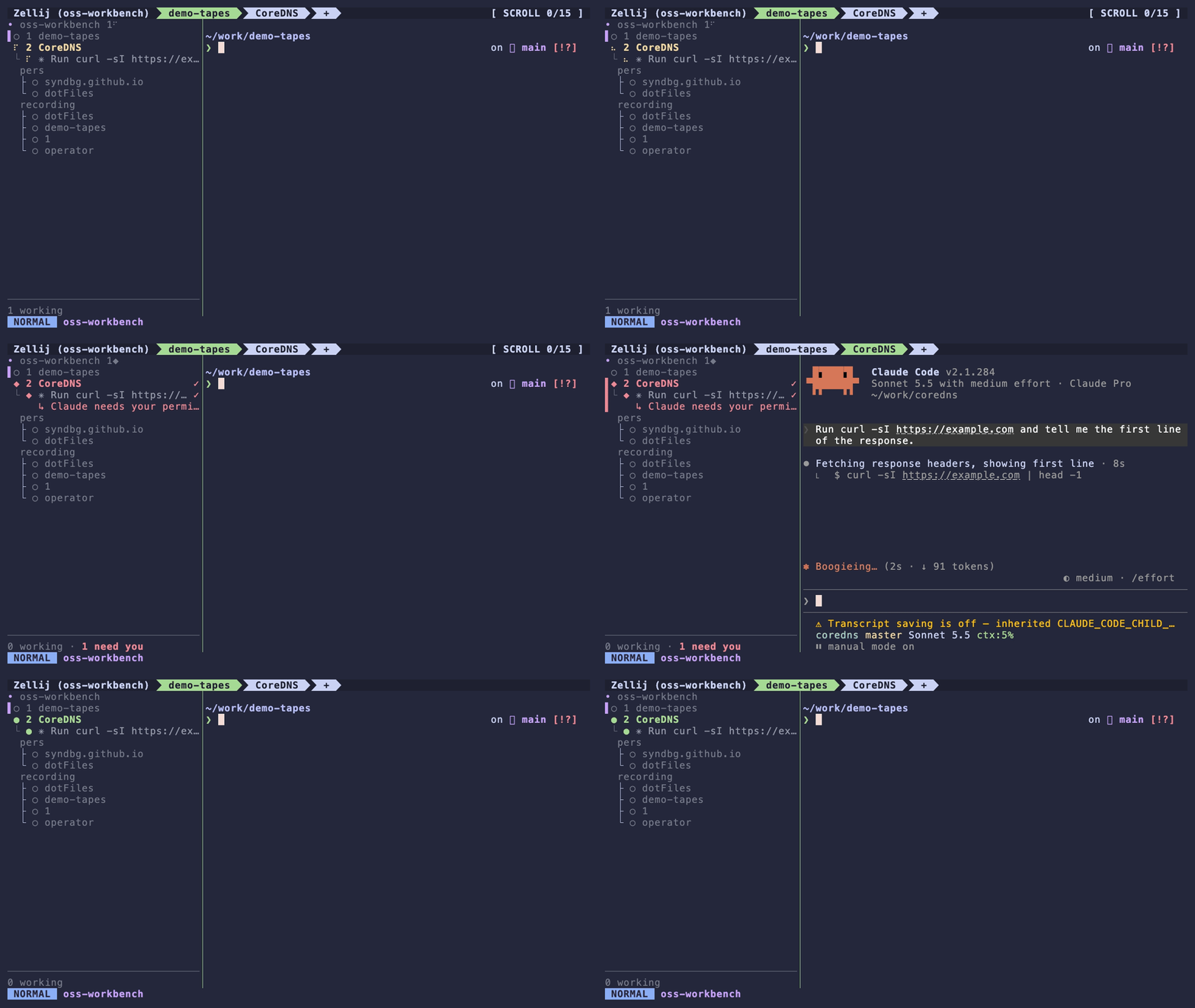
When an agent stops for approval, the radar marks its tab red and shows the permission message, while I keep working in another tab. Ctrl-a 2 jumps to that tab, Enter approves, and the dot turns green when the agent finishes.
Splits, a floating pane and fullscreen
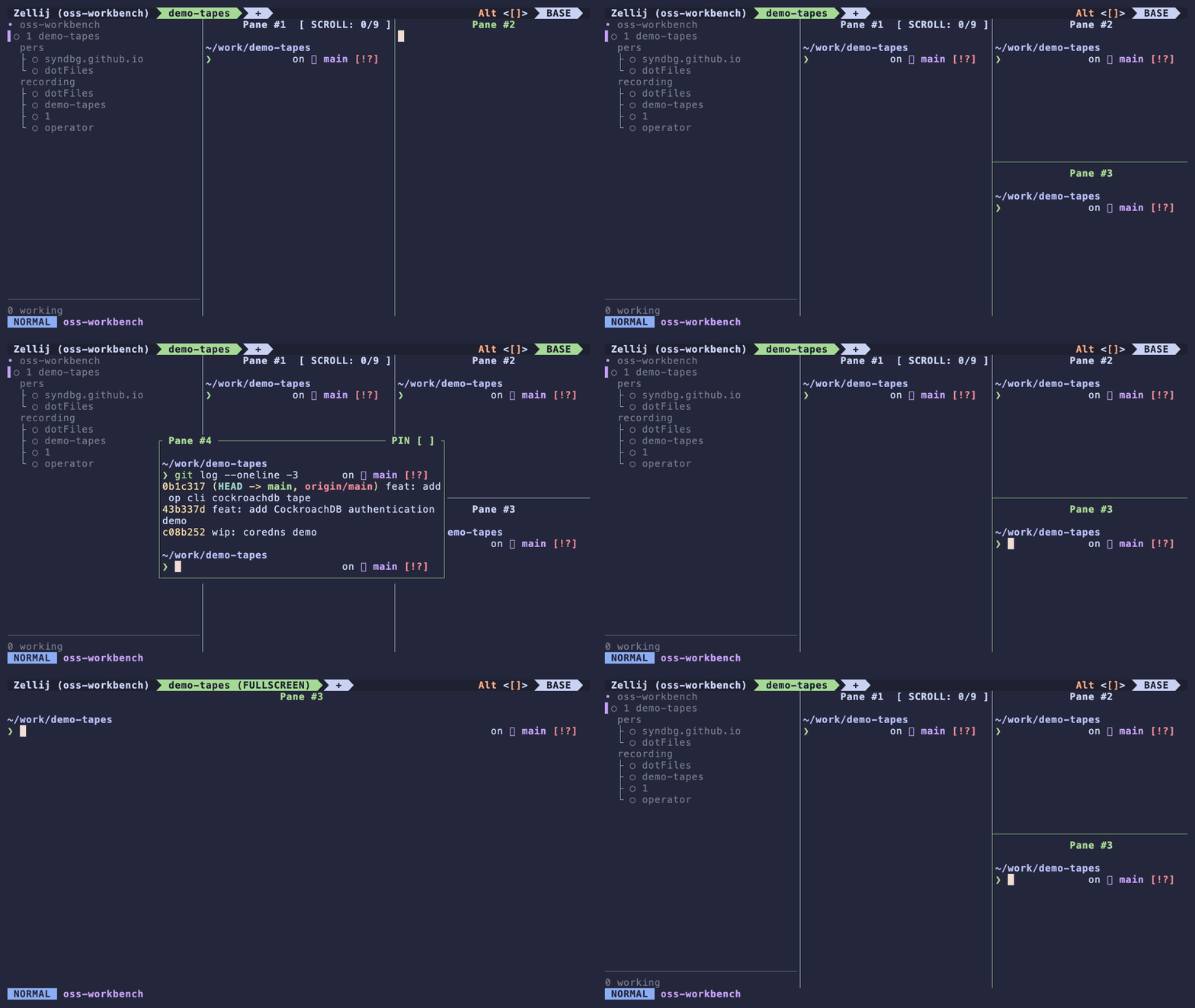
Ctrl-a / and Ctrl-a - use the tmux-style splits from above. The floating pane and fullscreen use Zellij’s default pane-mode keys: Ctrl-p w toggles floating panes and Ctrl-p f toggles fullscreen.
Detach and come back
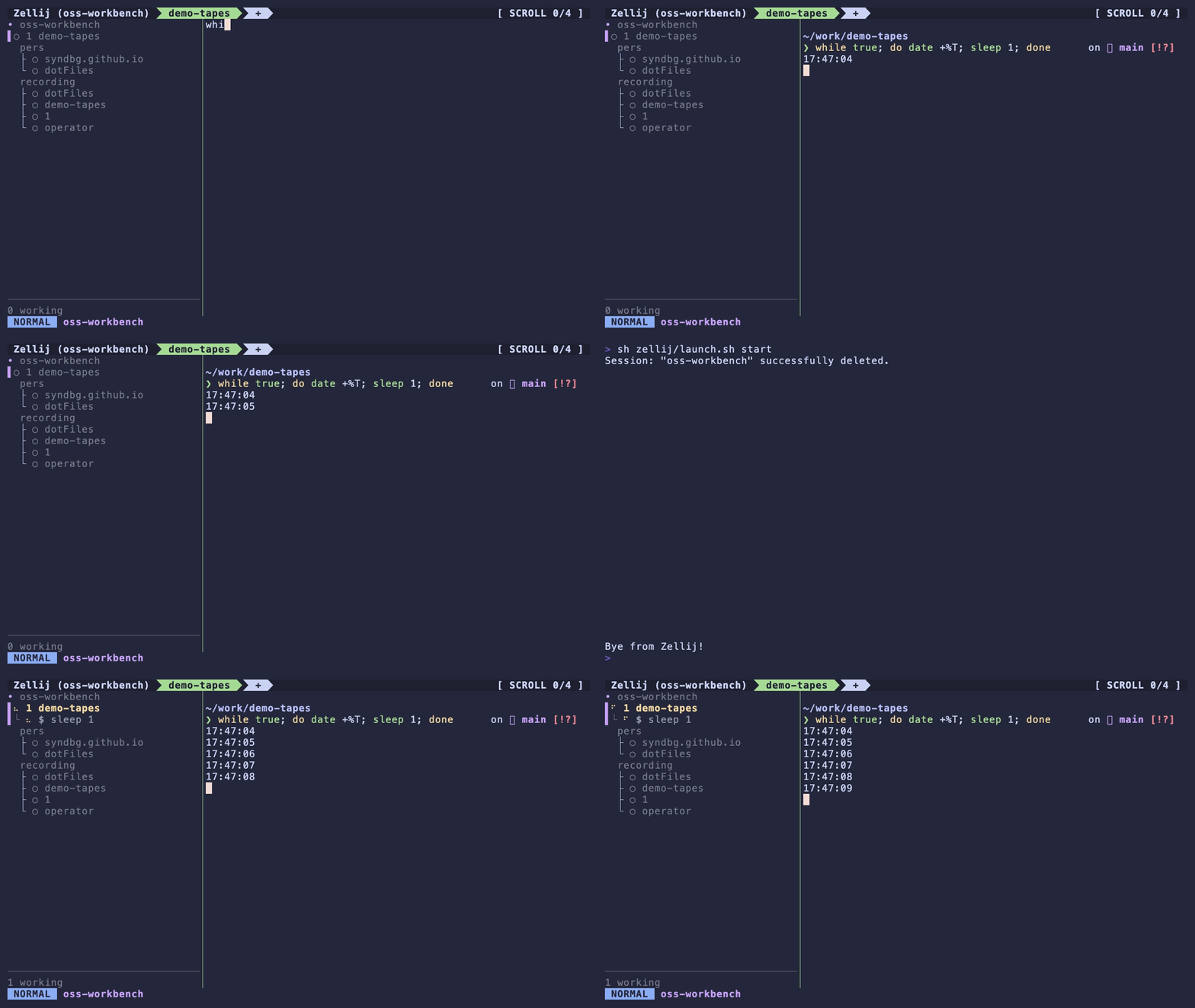
Ctrl-a d detaches and leaves every pane running. zellij attach <session> brings the session back. The auto-attach snippet below attaches to a session, or creates one, in every new terminal.
# Auto-attach without nesting inside another multiplexer or Herdr.
if [[ -o interactive && -t 0 && -z ${ZELLIJ:-} && -z ${TMUX:-} && ${HERDR_ENV:-} != 1 && -z ${CI:-} ]] && command -v zellij >/dev/null; then
  zellij attach -c
fi
Keep the Mac reproducible
chezmoi keeps the dotfiles in a Git repository and copies them into your home directory. Encrypted files need an age key:
brew install chezmoi age
chezmoi init
age-keygen -o ~/.config/chezmoi/key.txt   # prints the public key
# ~/.config/chezmoi/chezmoi.toml
encryption = "age"

[age]
    identity = "~/.config/chezmoi/key.txt"
    recipient = "age1...your-public-key..."
# Capture a live edit, then review it in the source repository.
chezmoi add ~/.zshrc
git -C "$(chezmoi source-path)" diff

# Install a source edit after reviewing it.
chezmoi diff ~/.zshrc
chezmoi apply ~/.zshrc

# Store ciphertext in the source repository.
chezmoi add --encrypt ~/.zsh.secrets
Back up ~/.config/chezmoi/key.txt separately. On a new Mac, restore it first, then run chezmoi init <your-repo>, review chezmoi diff and apply. The installed secrets are plaintext; the repository copy is encrypted.
Keep the tools in a Brewfile so a new Mac gets the same ones:
# Brewfile
brew "chezmoi"
brew "age"
brew "zellij"
brew "zinit"
brew "fzf"
brew "eza"
brew "starship"
brew "mise"
brew "direnv"
cask "ghostty"
brew bundle check --file=Brewfile --verbose
brew bundle install --file=Brewfile --no-upgrade

# Review extra installed packages before approving removals.
brew bundle cleanup --file=Brewfile
The unresolved items are alias precedence and measuring when deferred features become ready. The 80 ms result covers shell initialization followed by exit.
Complete configuration
Every file below is complete, so you can copy it as is. The heading of each one is the path where it lives. The chezmoi config and the Brewfile are in full in the section above.
~/.zshrc
This puts every piece above in order. Drop goenv if you do not use it, and add your own PATH lines.
# History
HISTSIZE=50000
SAVEHIST=50000
HISTFILE="${ZDOTDIR:-$HOME}/.zsh_history"
setopt inc_append_history share_history
setopt HIST_IGNORE_ALL_DUPS HIST_IGNORE_SPACE HIST_SAVE_NO_DUPS

export LANG=en_US.UTF-8
export EDITOR='nvim'
bindkey -v

# Homebrew installs the tools; Zinit loads the plugins.
fpath=("$HOMEBREW_PREFIX/share/zsh/site-functions" $fpath)
fpath=("$HOME/.config/zsh/completions" $fpath)
export ZSH_CACHE_DIR="${XDG_CACHE_HOME:-$HOME/.cache}/oh-my-zsh"
source "$HOMEBREW_PREFIX/opt/zinit/zinit.zsh"

# Load plugins after the first prompt to keep them out of the startup path.
zinit ice wait"0" lucid
zinit snippet OMZL::git.zsh
zinit ice wait"0" lucid
zinit snippet OMZL::directories.zsh
zinit ice wait"0" lucid
zinit snippet OMZL::functions.zsh

zstyle ':omz:plugins:eza' 'dirs-first' yes
zstyle ':omz:plugins:eza' 'git-status' yes
zstyle ':omz:plugins:eza' 'header' yes
zstyle ':omz:plugins:eza' 'icons' yes

zinit ice wait"0" lucid
zinit snippet OMZP::git
zinit cdclear -q
zinit ice wait"0" lucid
zinit snippet OMZP::direnv
zinit ice wait"0" lucid
zinit snippet OMZP::eza

# Cached completion. Rebuild ~/.zcompdump after adding completion sources.
autoload -Uz compinit
compinit -C
zinit cdreplay -q

eval "$(fzf --zsh)"
zinit ice wait"0" lucid
zinit light Aloxaf/fzf-tab
zinit ice wait"0" lucid
zinit light zsh-users/zsh-history-substring-search
bindkey '^P' history-substring-search-up
bindkey '^N' history-substring-search-down
bindkey -M vicmd 'k' history-substring-search-up
bindkey -M vicmd 'j' history-substring-search-down
zinit ice wait"0" lucid
zinit light zsh-users/zsh-autosuggestions

[[ -r "$HOME/.config/zsh/aliases.zsh" ]] && source "$HOME/.config/zsh/aliases.zsh"
[[ -r "$HOME/.config/zsh/functions.zsh" ]] && source "$HOME/.config/zsh/functions.zsh"

eval "$(goenv init -)"
export PATH="$HOME/.cargo/bin:$HOME/.local/bin:$PATH"
eval "$(mise activate zsh)"

[[ -r "$HOME/.zsh.secrets" ]] && source "$HOME/.zsh.secrets"
eval "$(starship init zsh)"

# Keep syntax highlighting last so it can highlight widgets from other plugins.
zinit ice wait"0" lucid
zinit light zsh-users/zsh-syntax-highlighting

# Auto-attach to Zellij without nesting inside another multiplexer.
if [[ -o interactive && -t 0 && -z ${ZELLIJ:-} && -z ${TMUX:-} && ${HERDR_ENV:-} != 1 && -z ${CI:-} ]] && command -v zellij >/dev/null; then
  zellij attach -c
fi
~/.config/starship.toml
format = "$directory$line_break$character"
right_format = "$git_branch$git_status"

[directory]
truncation_length = 0
truncate_to_repo = false
style = "bold #b7bdf8"

[git_branch]
style = "bold #c6a0f6"

[git_status]
style = "bold #ed8796"

[character]
success_symbol = "[❯](bold #a6da95)"
error_symbol = "[❯](bold #ed8796)"
~/.config/ghostty/config
# Global hotkey for the quick terminal
keybind = global:cmd+f1=toggle_visibility

# Drop down from the top and cover the whole screen, with no animation
quick-terminal-position = top
quick-terminal-size = 100%
quick-terminal-animation-duration = 0

cursor-style-blink = false

theme = Catppuccin Macchiato
font-size = 18
copy-on-select = clipboard
clipboard-trim-trailing-spaces = true
~/.config/zellij/config.kdl
theme "catppuccin-macchiato"
default_layout "better-default"

keybinds {
    unbind "Ctrl b"

    normal {
        bind "Ctrl a" { SwitchToMode "Tmux"; }
    }

    scroll {
        bind "Ctrl b" { PageScrollUp; }
    }

    tmux {
        bind "Ctrl a" { Write 1; SwitchToMode "Normal"; }
        bind "e" "Esc" { EditScrollback; SwitchToMode "Normal"; }
        bind "1" { GoToTab 1; SwitchToMode "Normal"; }
        bind "2" { GoToTab 2; SwitchToMode "Normal"; }
        bind "3" { GoToTab 3; SwitchToMode "Normal"; }
        bind "4" { GoToTab 4; SwitchToMode "Normal"; }
        bind "5" { GoToTab 5; SwitchToMode "Normal"; }
        bind "6" { GoToTab 6; SwitchToMode "Normal"; }
        bind "7" { GoToTab 7; SwitchToMode "Normal"; }
        bind "8" { GoToTab 8; SwitchToMode "Normal"; }
        bind "9" { GoToTab 9; SwitchToMode "Normal"; }
        bind "r" "," { SwitchToMode "RenameTab"; TabNameInput 0; }
        bind "Shift r" {
            Run "sh" "-c" "printf 'New session name: '; IFS= read -r name || exit; [ -n \"$name\" ] || exit; exec zellij action rename-session \"$name\"" {
                floating true
                close_on_exit true
                name "Rename session"
            };
            SwitchToMode "Normal";
        }
        bind "-" { NewPane "Down"; SwitchToMode "Normal"; }
        bind "/" { NewPane "Right"; SwitchToMode "Normal"; }
        bind "q" {
            LaunchOrFocusPlugin "session-manager" {
                floating true
                move_to_focused_tab true
            };
            SwitchToMode "Normal";
        }
        bind "Shift q" {
            Run "zellij" "kill-all-sessions" {
                floating true
                close_on_exit true
                name "Confirm: kill all Zellij sessions"
            };
        }
        bind "s" "Shift s" {
            LaunchOrFocusPlugin "session-manager" {
                floating true
                move_to_focused_tab true
            };
            SwitchToMode "Normal";
        }
    }
}

plugins {
    radar location="file:~/.config/zellij/plugins/zj_radar.wasm" {
        naming "managed"
        density "compact"
        header false
        session_tree true
    }
}
~/.config/zellij/layouts/better-default.kdl
Each tab gets the native tab bar on top, the radar rail (32 columns) on the left, your panes in the middle, and a zjstatus line at the bottom. Zellij downloads zjstatus from GitHub’s latest-release URL the first time it starts, so you need network access once and the version is not pinned. To pin it, replace latest/download in the URL with download/<tag> for a release you have tested.
layout {
    default_tab_template {
        pane size=1 borderless=true {
            plugin location="zellij:tab-bar"
        }
        pane split_direction="vertical" {
            pane size=32 borderless=true {
                plugin location="radar"
            }
            children
        }
        pane size=1 borderless=true {
            plugin location="https://github.com/dj95/zjstatus/releases/latest/download/zjstatus.wasm" {
                format_left "{mode} #[fg=#c6a0f6,bold]{session}"
                format_center ""
                format_right ""
                format_space "#[bg=#24273a]"

                mode_normal "#[bg=#8aadf4,fg=#24273a,bold] NORMAL "
                mode_tmux "#[bg=#f5a97f,fg=#24273a,bold] TMUX "
            }
        }
    }

    new_tab_template {
        pane size=1 borderless=true {
            plugin location="zellij:tab-bar"
        }
        pane split_direction="vertical" {
            pane size=32 borderless=true {
                plugin location="radar"
            }
            pane focus=true
        }
        pane size=1 borderless=true {
            plugin location="https://github.com/dj95/zjstatus/releases/latest/download/zjstatus.wasm" {
                format_left "{mode} #[fg=#c6a0f6,bold]{session}"
                format_center ""
                format_right ""
                format_space "#[bg=#24273a]"

                mode_normal "#[bg=#8aadf4,fg=#24273a,bold] NORMAL "
                mode_tmux "#[bg=#f5a97f,fg=#24273a,bold] TMUX "
            }
        }
    }

    tab focus=true {
        pane
    }
}